This is a plugin that adds tabs to the Roundcube settings page, allowing the user to set their vacation message or change their password. Behind the scenes, it logs in to qmailadmin as that user to make the changes. Both vacation and password tabs can be individually disabled.
Note: This screen-scrapes your qmailadmin installation, so currently only works if qmailadmin is in English.
Installation
Extract the zip file into the plugins directory of your Roundcube installation. Under plugins, you should have a directory "qmailadmin", containing "qmailadmin.php" and the other files.
Edit the file config.inc.php, making sure to change the path to your own qmailadmin installation. The configuration options are documented within this file.
You will then find 'Vacation Message' and 'Change Password' tabs on the user settings page.
Screenshots
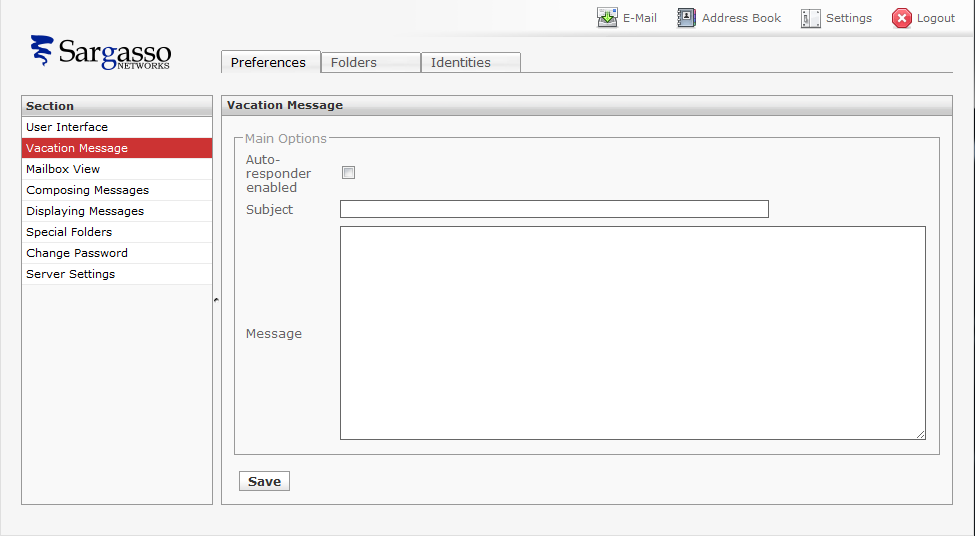
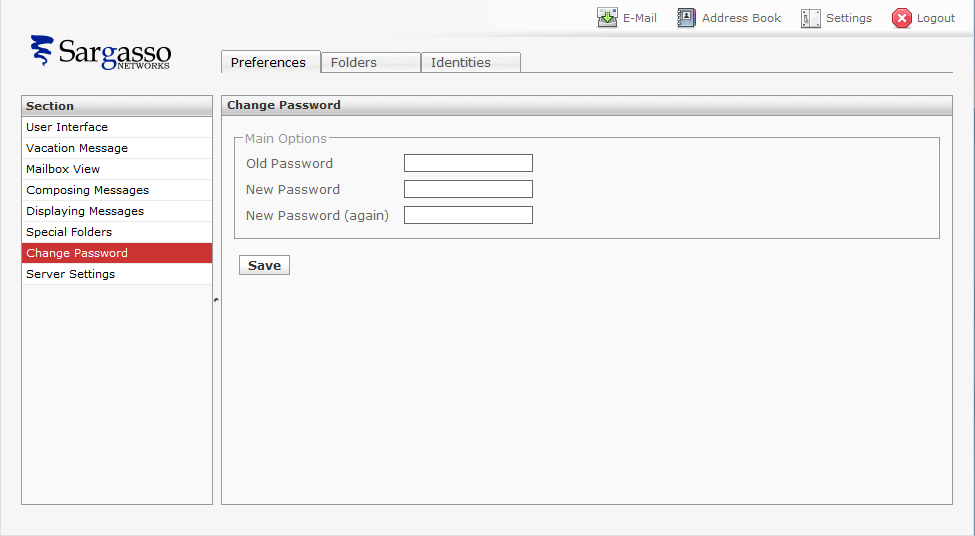
How it works
Rather than try to modify qmail files or call vpasswd directly, it uses qmailadmin which is already setuid.
It logs in to qmailadmin using the current user's credentials (stored encrypted in their session), retrieves the current settings, modifies them, and saves them again. As qmailadmin has no useful API, it does this by screenscraping the HTML form and pulling out all the INPUT/TEXTAREA elements.
After changing the password, it stores the new password on the user's session, so they don't have to log back in to continue reading their e-mail.
Change Log
1.0.1, 2011-08-29
- Moved configuration options into plugin-specific config.inc.php
- Added optional warning message when vacation message is set.
- Updated for Roundcube 0.5
- Under Roundcube 0.5, use new method to report preference form errors.
1.0.0, 2011-08-28
- Initial release
Future
I may add the option to change the user's message forwarding rules as well (none/delete/forward/forward and save a copy), if there is any demand for this.
License

This work is licensed under a Creative Commons Attribution-ShareAlike 3.0 Unported License.
| Attachment | Size |
|---|---|
| qmailadmin-1.0.1.zip | 5.2 KB |
Thank you so much - it works!
I've been fighting with the roundcube native password plugin with no success because I don't use mysql with vpopmail and I don't run the vpopmaild daemon. Digging through the net today I happened to see this and had it working in minutes! I changed my password, logged off/on and changed it again and got an error the second time but it changed it anyway, probably a timing issue but I"m not sure.
Any ideas on a password reminder or password reset plugin?
If it happens again, let me
If it happens again, let me know what error you get (and anything in your roundcube errors file), and I'll track it down.
Not sure about the other requests; although vpopmail can be configured to store cleartext passwords, you would also need to store something like the user's alternative e-mail address, or answers to security questions, so it would need a whole new system.
Qmailadmin/Vpopmail Forgotten Password Recovery
I've been digging for days to find a way to do the password recovery option. There is one Forgotten Password plugin I've found but it requires the original Password plugin to do the change. It would have to be written from scratch and I'm just nowhere near that ability right now. I know the basic steps but no idea how to code it.
1st requirement would be to insert a field into the roundcube table or create a new table containing an alternative email address for each user. There would have to be a form in roundcube settings for supplying the alternate email. Next would require a form accessible from a link on the login page that the user would enter their email address. The script would query the table (give an error if there's no alt email) , then call vuserinfo to get their password and send that to the alt email address. A more complicated version would create a random new password, use the qmailadmin plugin to change it to the new password and send the new temp password to the user's alt email. would also be handy to email postmaster@vodmain notifying of the change and if they didnt have an alt email address notify postmaster and tell the user the postmaster has been notified that they have forgotten their password.
Support for Danish language
HI David,
Can you tell me if your plugin will support danish characters. When I use autoreply feature in qmailadmin the danish characters show up properly in the message file created from my qmail server. But if I create the autoreply using your plugin than the danish characters are not recognized. Can you suggest something to rectify this. Is there anything in your plugin that can be changed so that danish characters are properly recreated in the message file once saved.
Tak for din mail.
Jeg er på farten og har begrænset adgang til mails.
Jeg er tilbage på kontoret mandag den 28. september.
changes to
Tak for din mail.
Jeg er på farten og har begrænset adgang til mails.
Jeg er tilbage på kontoret mandag den 28. september.
IT WORKS!!!
Though I have a notification "An error occured while saving" when trying to change the password.
Im using roundcube 0.5.4
setting has been reset
when update the password or vacation use the pulgins, old setting at qmailadmin will lost such as "Spam Detection" , "Save a Copy "...
My settings too..... Are gone.
I too have noticed the loss of settings when setting the vacation message, under qmailadmin. Can this be fixed? Would setting up qmail admin to apply the spam filter setting by default help this at all? Thanks.
Vacation - Error when saving
I am using centos 5.5, qmailadmin-toaster 1.2.12-1.3.8 and roundcubemail 0.71.
When saving the vacation page, Error "SERVICE CURRENTLY NOT AVAILABLE" Error No. [1001].
Check the logs/errors:
PHP Error: Unable to login in to qmailadmin.
qmailadmin is there as I can http in directly.
Any idea what is wrong?
Thanks.
Try https
Try https
can this be used with qmail only?
hello and thank you .
i wanted to know if it works with qmail too , i dont have qmail admin installed , im running kloxo 6.1.12 with qmail . so far i couldnt succeed .
i would be thankful if you guide me on this .
thank you very much :)
UTF char problems
Hello,
Good work! I tried this and one thing does not seem to work correctly. When Auto-Reply message contains some letters like ęėėįš (they must be coded in UTF8) I get ugly symbols instead.
Could you help, please?
Message Forwarding
Hi David,
This plugin works great. But i am greedy. I am looking forward to have message forwarding rules too. Will you have the time to do it? Please find time
Many thanks
mon
Unable to get it to work
I was not lucky enough to get this to work. I get error 1001 or 1003 all the time, with the following in the log file:
PHP Error: Unable to login to qmailadmin (POST /rcube/?_task=settings&_action=save-prefs)
HTTP logs do show the URL being accessed. And, Qmailadmin works fine while accessed directly.
SKP
Not work with plugin_manager
I'm having problems when active it with the plugin manager.
It does not work with plugin_manager.
If I activate it within plugin_manager tool if it does not work put it in main.inc.php active (disabling plugin_manager) it works correctly.
Could you help me?
Tks
Error after upgrade to 1.3.0
I started receiving this error after upgrading recently:
PHP Fatal error: Call to undefined function Q() in /var/www/roundcubemail/plugins/qmailadmin/qmailadmin.php on line 129
My solution was to change both lines 129-130 and 163-164 to use the gettext function instead of the Q function.
This was the original lines:
$blocks = array('main' => array('name' => Q(rcube_label('mainoptions'))),
                );
And this is the corrected line:
$blocks = array('main' => array('name' => $this->gettext('mainoptions')));Hope this helps someone else. I've used this plugin for years without any issues.